
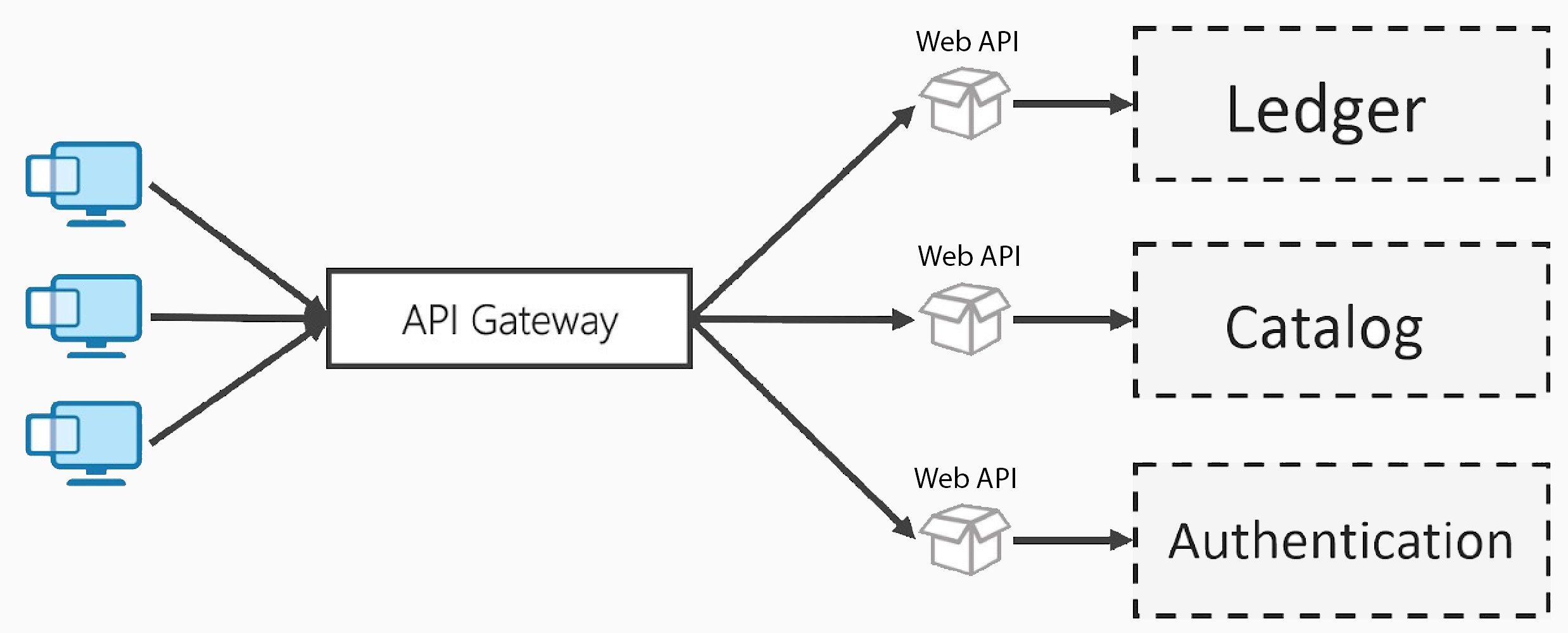
In a microservices architecture, clients often need to communicate with multiple services scattered across different endpoints.
This direct communication approach creates several challenges.
Cross-cutting concerns like authentication, logging and rate limiting must be implemented individually in each service, resulting in code duplication and inconsistent behavior across your system.
Managing routing, versioning and security policies becomes increasingly complex as your service count grows.
Reverse Proxy solves these problems by providing a unified entry point that centralizes, secures and manages all incoming traffic.
The .NET ecosystem provides several excellent options for implementing a reverse proxy. Among the most powerful is YARP (Yet Another Reverse Proxy).
YARP
YARP is a high-performance, open-source reverse proxy developed by Microsoft specifically for .NET applications.
It serves as a central entry point for handling client requests. It receives incoming traffic and forwards it to the right backend service, making it a good fit for microservices and serverless architectures where advanced routing is required.
It provides essential capabilities such as routing, load balancing, authentication and health checks. YARP has also been proven at scale, Microsoft uses it to process billions of requests every day in production.
In short, YARP is a NuGet package that turns a standard .NET Web API project into a reverse proxy, efficiently managing and orchestrating traffic behind the scenes.
Let's explore how to set up and configure YARP for your applications.
Getting Started
To begin working with YARP, you'll need to create a new Web API project and install the required NuGet package. You can accomplish this through the NuGet Package Manager or by executing the following command in the Package Manager Console:
dotnet add package Yarp.ReverseProxyAfter setting up the project and installing the package, you'll need to modify your Program.cs file to integrate YARP:
var builder = WebApplication.CreateBuilder(args);

builder.Services.AddReverseProxy()
    .LoadFromConfig(builder.Configuration.GetSection("ReverseProxy"));

var app = builder.Build();

app.MapReverseProxy();

app.Run();
AddReverseProxy registers all necessary YARP services in the dependency injection container.
LoadFromConfig reads the reverse proxy configuration from the specified configuration section in your settings.
MapReverseProxy integrates the YARP middleware into the request processing pipeline.
With the basic setup complete, the next step is to define your routes and clusters in the appsettings.json configuration file.
Configuring appsettings.json
The appsettings.json file contains all the routing rules and cluster configurations required for YARP to function as a reverse proxy. Here's the basic structure:
{
  "ReverseProxy": {
    "Routes": {
    },
    "Clusters": {
    }
  }
}
The Routes section defines how incoming requests are matched and directed to specific clusters.
The Clusters section defines the downstream services (your backend APIs) and their network locations.
Currently, both sections are empty, so YARP won't route any requests. Let's populate them with actual configuration.
For this demonstration, I've created a separate Product.Api project to represent one of the services in a microservices architecture. It provides standard CRUD operations for product management.
Here's a complete example of an appsettings.json file that routes reverse proxy requests from /yarp/products to the downstream Product.Api running at https://localhost:7215:
{
  "ReverseProxy": {
    "Routes": {
      "product-route": {
        "ClusterId": "product-cluster",
        "Match": {
          "Path": "/yarp/products/{**catch-all}"
        },
        "Transforms": [
          {
            "PathPattern": "/products/{**catch-all}"
          }
        ]
      }
    },
    "Clusters": {
      "product-cluster": {
        "Destinations": {
          "product-destination": {
            "Address": "https://localhost:7215"
          }
        }
      }
    }
  }
}
Let me break down the key components:
- Routes - Define request matching and routing logic
- ClusterId - Links the route to a specific cluster
- Match.Path - The URL pattern that incoming requests must match
- Transforms - Rules for modifying the request path before forwarding
- Clusters - Define the backend services and their network addresses
- Destinations - The actual backend service endpoints
The {**catch-all} pattern enables YARP to forward all sub-paths, making it simple to route entire API sections efficiently.
Now you can start both the reverse proxy and the Product.Api project.
Client applications should direct their requests to the /yarp/products endpoints:
- GET https://localhost:5002/yarp/products
- POST https://localhost:5002/yarp/products
- PUT https://localhost:5002/yarp/products/{id}
- DELETE https://localhost:5002/yarp/products/{id}
The reverse proxy will forward these requests to the Product.Api service.
Load Balancing
One of YARP's standout features is its sophisticated load balancing capabilities.
You can configure multiple destinations within a single cluster, and YARP will intelligently distribute requests among them based on your chosen load balancing strategy.
{
  "ReverseProxy": {
    "Clusters": {
      "product-cluster": {
        "LoadBalancingPolicy": "RoundRobin",
        "Destinations": {
          "product-destination-1": {
            "Address": "https://localhost:7215"
          },
          "product-destination-2": {
            "Address": "https://localhost:7216"
          }
        }
      }
    }
  }
}
YARP provides several load balancing strategies:
- RoundRobin - Distributes requests sequentially across all destinations
- LeastRequests - Routes to the destination with the lowest active request count
- PowerOfTwoChoices - Selects two random destinations, then chooses the one with fewer requests
- Random - Randomly selects a destination from the available pool
Health Checks
YARP incorporates comprehensive health checking to ensure traffic is only routed to healthy destinations.
{
  "ReverseProxy": {
    "Clusters": {
      "product-cluster": {
        "HealthCheck": {
          "Active": {
            "Enabled": true,
            "Interval": "00:00:10",
            "Timeout": "00:00:05",
            "Policy": "ConsecutiveFailures"
          },
          "Passive": {
            "Enabled": true,
            "Policy": "TransportFailureRate",
            "ReactivationPeriod": "00:01:00"
          }
        },
        "Destinations": {
          "product-destination": {
            "Address": "https://localhost:7215",
            "Health": "https://localhost:7215/health"
          }
        }
      }
    }
  }
}
This configuration enables both active and passive health monitoring to maintain reliable routing.
Conclusion
Implementing a reverse proxy is crucial when building a microservices architecture.
YARP makes this process straightforward and powerful in the .NET ecosystem with minimal configuration and exceptional performance characteristics.
If you're looking for a high-performance reverse proxy for your APIs, YARP is definitely worth considering.
If you want to check out examples I created, you can find the source code here:
Source CodeI hope you enjoyed it, subscribe and get a notification when a new blog is up!