
Notifying users is a common requirement in modern applications.
Transactional emails are a common approach for notifying, whether for welcome messages, password resets or regular updates.
.NET offers several ways to send emails using Smtp or other providers like SendGrid or Mailjet.
Depending on a provider your code will differ, which is especially problematic when you are exploring different options.
This is where FluentEmail jumps in with its amazing API for us to use different providers.
Why FluentEmail
FluentEmail is all in one email sender for .NET. It's the easiest way to send emails because of its unified interface and template support.
With its fluent API, you can create emails using plain text or HTML, and integrate templating engines like Razor for dynamic content.
FluentEmail supports a range of popular delivery providers, including:
- SMTP
- SendGrid
- Mailgun
- MailKit
While FluentEmail hasn't been actively maintained recently, I continue to use it in my projects because it remains stable and reliable in my experience.
Getting Started
To get started with FluentEmail, you'll first need to install the necessary NuGet packages. You can do this via the NuGet Package Manager or by running the following command in the Package Manager Console:
dotnet add package FluentEmail.SmtpIn this example, I chose to send emails using an SMTP server, which requires the FluentEmail.Smtp package.
If you're using a different provider, such as SendGrid or Mailgun, you'll need to install the corresponding package (e.g., FluentEmail.SendGrid, FluentEmail.Mailgun, etc.).
Configuring smtp4dev
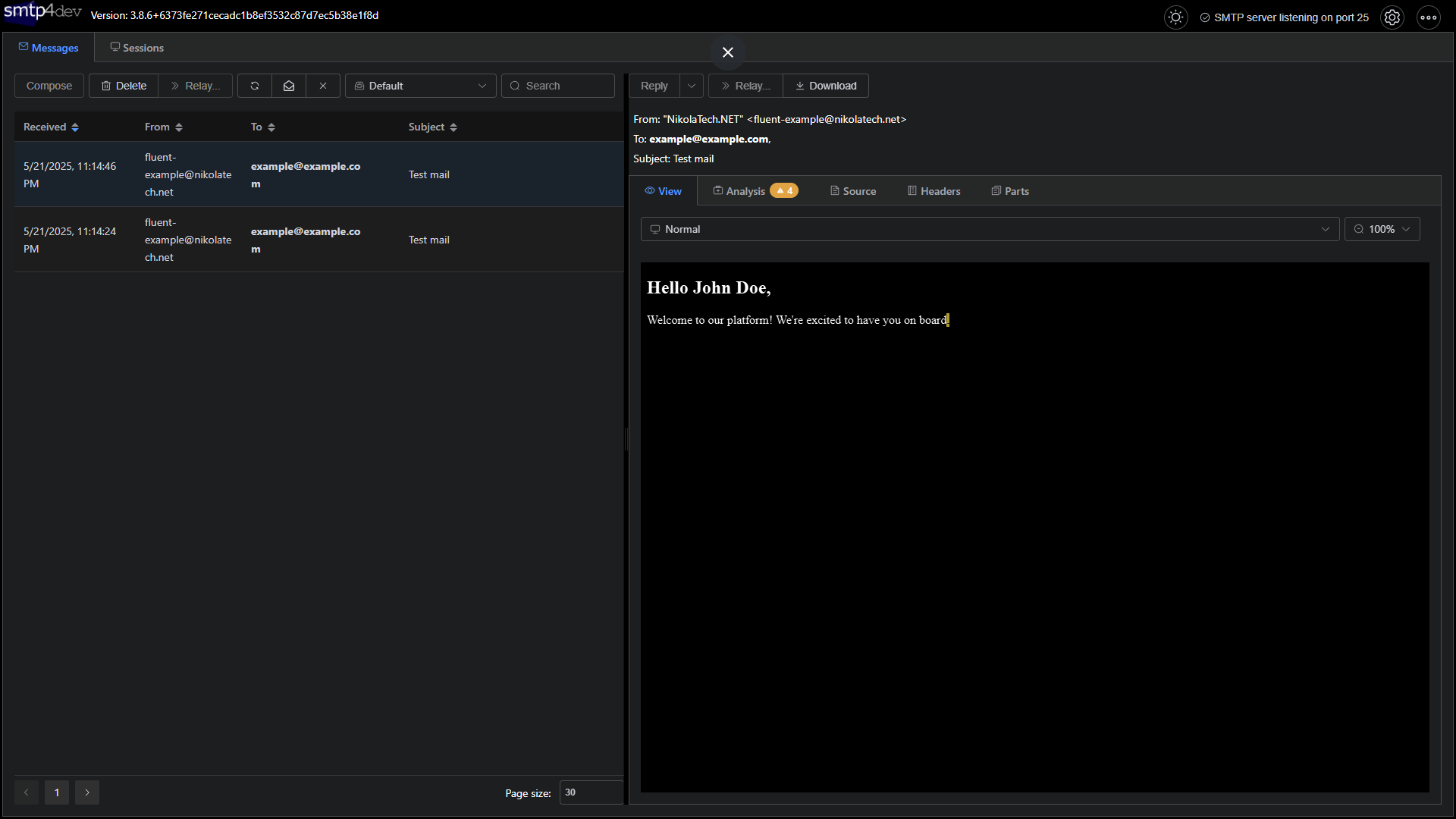
To create a smooth development and testing experience without configuring a real SMTP server, we’ll use smtp4dev.
Smtp4dev is a fake SMTP server designed specifically for local development.
It captures outgoing emails and provides a web interface to view and inspect them. To run it, we’ll add it to our Docker Compose setup:
fluentmailexample.smtp4dev:
    image: rnwood/smtp4dev
    container_name: smtp4dev
    ports:
        - "3000:80"
        - "2525:25"
    restart: unless-stopped
Once running, you can access the smtp4dev UI at http://localhost:3000 to view and search captured emails:
Configuring FluentEmail
The best way to use FluentEmail is by configuring the sender and template options through dependency injection:
builder.Services
    .AddFluentEmail(
        configuration["Email:SenderEmail"],
        configuration["Email:SenderName"])
    .AddSmtpSender(new SmtpClient(
        configuration["Email:Host"],
        configuration.GetValue<int>("Email:Port"))
    {
        EnableSsl = configuration.GetValue<bool>("Email:EnableSsl")
    });
The Host and Port values depend on the SMTP provider you're using. In our case, when using smtp4dev, the host should be set to fluentmailexample.smtp4dev and the port to 25.
Basic Usage
With dependency injection in place you can use IFluentEmail interface, set subject, body and use Send().
app.MapGet("/test/{email}", (string email, IFluentEmail fluentEmail) =>
{
    return Results.Ok(fluentEmail
        .Subject("Test mail")
        .Body("Specify your mail body!")
        .Send());
}).WithOpenApi();
The best part? If you switch to a different email provider, your code will continue to work with no changes because FluentEmail abstracts that for you.
Transactions
FluentEmail also supports multiple template rendering engines. To use template rendering you need to configure it as part of your dependency injection.
For Razor templates, add AddRazorRenderer():
builder.Services
    .AddFluentEmail(
        configuration["Email:SenderEmail"],
        configuration["Email:SenderName"])
    .AddRazorRenderer()
    .AddSmtpSender(new SmtpClient(
        configuration["Email:Host"],
        configuration.GetValue<int>("Email:Port"))
    {
        EnableSsl = configuration.GetValue<bool>("Email:EnableSsl")
    });
After that, you can use the UsingTemplate methods instead of manually writing the email body:
app.MapGet("/razor/{email}", (string email, string name, IFluentEmail fluentEmail) =>
{
    return Results.Ok(fluentEmail
        .To(email)
        .Subject("Test mail")
        .UsingTemplateFromFile(
            "./Templates/WelcomeEmail.cshtml",
            new WelcomeEmailModel(name))
        .Send());
}).WithOpenApi();
FluentEmail supports:
- UsingTemplateFromFile
- UsingTemplate
- UsingTemplateFromEmbedded and more.
Conclusion
FluentEmail provides a clean and flexible way to send emails in .NET applications.
With its unified API, support for popular email providers, and seamless integration with templating engines like Razor, it simplifies the complexity of email delivery.
Even though it hasn’t seen recent updates, FluentEmail continues to be a reliable tool for me.
If you want to check out examples I created, you can find the source code here:
Source CodeI hope you enjoyed it, subscribe and get a notification when a new blog is up!