

CORS is one of those errors almost every developer runs into at least once while building a Web API.
We all manage to find a quick fix at some point, but the understanding of how CORS actually works is often overlooked.
In this blog post, we’ll take a closer look at what CORS is and how to handle it properly.
What is CORS?
Cross-Origin Resource Sharing (CORS) is a browser security feature that controls how web applications can request resources from a different origin (domain, protocol, or port).
It helps prevent malicious websites from making unauthorized requests to another site on behalf of the user.
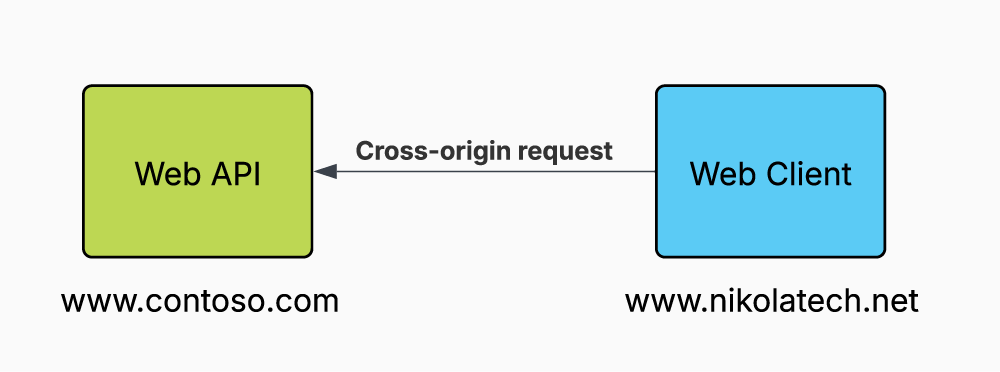
By default, browsers block cross-origin requests due to the Same-Origin Policy.
For example, a frontend running on https://nikolatech.net cannot access an API at https://contoso.com unless the API explicitly allows it.
CORS enables controlled access by using specific HTTP headers. A server can indicate which origins are allowed using headers like Access-Control-Allow-Origin.
Enable CORS
First step is to register and configure CORS using AddCors():
var builder = WebApplication.CreateBuilder(args);

builder.Services.AddCors(options =>
{
    options.AddPolicy("AllowFrontend", policy =>
    {
        policy.WithOrigins("https://your-frontend.com")
              .AllowAnyHeader()
              .AllowAnyMethod();
    });
});
CORS policies should help you define how the server responds to cross-origin requests, you can define one or more named CORS policies.
Here are most common methods used to configure:
- WithOrigin() will allow only specific domains to make cross-origin requests.
- AllowAnyOrigin() will allow any domain to make requests.
- WithHeaders() will allow only specific headers in requests.
- AllowAnyHeader() will allow any header.
- WithMethods() will allow only specific HTTP methods.
- AllowAnyMethod() will any HTTP method.
NOTE: You can use AddDefaultPolicy() to add a default policy instead of using AddPolicy().
Once you configure your CORS policies, ASP.NET Core allow you to apply cross-origin requests in three different ways:
- Using Middleware
- Using Attributes
- With Minimal Endpoints
Using Middleware
Using middleware to apply a common CORS policy is the most common approach because it allows you to apply CORS globally, affecting all endpoints.
To add middleware properly, it's important to add it before UseAuthorization() and after UseRouting():
app.UseRouting();

app.UseCors("CorsPolicy");

app.UseAuthorization();
NOTE: If you're applying the default policy, there's no need to specify a policy name.
Using Attributes
In case you are working with controllers and you want to control CORS policies at the controller or endpoint level you can use [EnableCors] and [DisableCors] attributes:
[ApiController]
[Route("[controller]")]
[EnableCors("CorsPolicy")]
public class ExampleController : ControllerBase
{
    [HttpGet]
    public IActionResult Get() => Ok(Random.Shared.Next());
}
With Minimal Endpoints
In case you are working with minimal endpoints and you want to control CORS policies at the endpoint or group level you can use RequireCors() method:
var group = app.MapGroup("products").RequireCors("CorsPolicy");app.MapGet("/weatherforecast", () =>
{
var forecast = GetWeatherForecasts();
return forecast;
})
.RequireCors("CorsPolicy");Preflight Requests
A preflight request is an automatic HTTP OPTIONS request sent by the browser before the actual request. It checks whether the actual cross-origin request is safe to send.
When CORS is enabled with the appropriate policy, ASP.NET Core generally responds to CORS preflight requests automatically.
You can set the preflight cache expiration time. The Access-Control-Max-Age header specifies how long the response to the preflight request can be cached.
To set this header, call SetPreflightMaxAge():
builder.Services.AddCors(options =>
{
    options.AddPolicy("MySetPreflightExpirationPolicy",
        policy =>
        {
            policy.WithOrigins("http://example.com")
                   .SetPreflightMaxAge(TimeSpan.FromSeconds(2520));
        });
});
Conclusion
CORS may seem like just another annoying error when building Web APIs, but it's actually a nice browser security feature.
In .NET you can easily apply CORS policies, whether globally through middleware, at the controller level with attributes, or directly on minimal endpoints.
By setting up CORS properly, you ensure that your APIs are both accessible and secure, enabling only the right origins to interact with your backend.
If you want to check out examples I created, you can find the source code here:
Source CodeI hope you enjoyed it, subscribe and get a notification when a new blog is up!